


.jpg)
Deirdre Hennigar
Analyse technique, experte en la matière

Marco Perretta
Analyse technique,
expert en la matière
Aperçu
Lors d'un examen de la surface d'attaque externe, l'équipe CyberShell a validé un problème touchant un environnement IBM webMethods Integration Server accessible depuis Internet.
Le problème n'était pas que ce logiciel intermédiaire disposait de fonctions de fichiers, de client HTTP, de journalisation ou d'intégration (ces fonctions sont normales pour une plateforme d'intégration d'entreprise). Le risque s'est concrétisé parce que des services intégrés sensibles étaient accessibles depuis Internet et exécutables sans identité authentifiée correctement délimitée.
Qu'est-ce qu'un logiciel intermédiaire (middleware)?
Le logiciel intermédiaire est la couche logicielle qui permet aux systèmes d'affaires de communiquer entre eux. Dans de nombreuses entreprises, il se situe entre l'ERP, le CRM, les systèmes de paiement, les entrepôts, les partenaires SFTP, les plateformes SaaS, les portails clients et les applications internes.
IBM webMethods Integration Server fait partie du portefeuille IBM webMethods Integration, qui sert de logiciel intermédiaire à de nombreuses organisations dans le monde. La plateforme a été historiquement développée sous le nom Software AG webMethods avant qu'IBM ne conclue l'acquisition de webMethods auprès de Software AG en 2024. En pratique, elle se place entre les systèmes d'affaires et les aide à échanger des données, à déclencher des flux de travail, à transformer des messages et à relier les applications internes aux partenaires externes.
Cette position centrale est utile pour les opérations et attrayante pour les attaquants.
Un serveur d'intégration sait souvent :
- où se trouvent les systèmes internes
- quels comptes de service déplacent les données
- quels certificats et magasins de clés sont utilisés
- comment les fichiers sont nommés et transférés
- quels points de terminaison de partenaires sont de confiance
- quelles tâches s'exécutent en production
- quels journaux contiennent les traces de ces flux de travail
Aperçu de l'exposition
À titre d'exemple ponctuel, une recherche Censys portant sur le contenu HTTP faisant référence à IBM webMethods a renvoyé 22 hôtes exposés à Internet dans le monde, dont 2 au Canada.
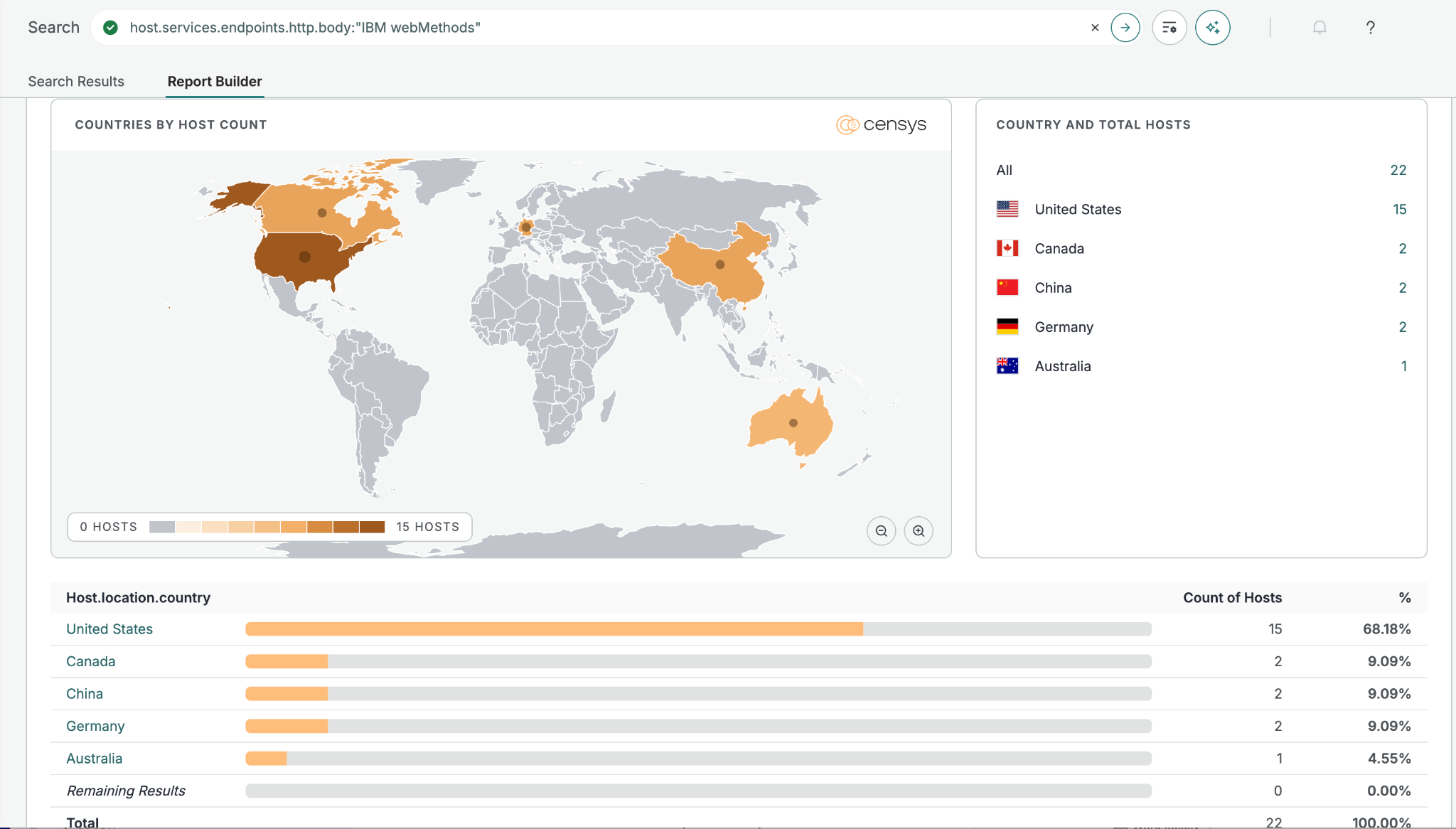
Il ne s'agit que d'une requête improvisée visant des cibles potentielles propres au logiciel intermédiaire webMethods d'IBM / Software AG; un grand nombre de serveurs sont renforcés de façon à omettre ou à masquer la présence d'un logiciel précis.
Exemples de requêtes Censys :
host.services.endpoints.http.body:"IBM webMethods"(host.services.port:5555 or host.services.port:5543 or host.services.port:9999 or host.services.port:8585) and host.services.endpoints.http.body:"webMethods"
Conseils en bref
Examinez le logiciel intermédiaire exposé et traitez-le comme une frontière de sécurité privilégiée.
Contrôles d'accès
- Limitez l'accès Internet à des adresses IP sources précises.
- Retirez l'exécution anonyme ou par défaut des services sensibles.
- Appliquez des ACL de moindre privilège aux fonctions intégrées de fichiers, de client, de diagnostic et d'administration.
Contrôles de confinement
- Refusez par défaut les connexions sortantes du logiciel intermédiaire.
- Traitez les journaux comme des dépôts de données sensibles.
- Renouvelez les clés, les mots de passe, les identifiants SFTP et les secrets des comptes de service après une exposition en lecture de fichiers.
Pour chaque serveur d'intégration accessible depuis Internet, demandez-vous :
- Un utilisateur non authentifié, par défaut, invité ou un groupe large peut-il exécuter un service sensible?
- La plateforme peut-elle lire des chemins arbitraires du système de fichiers ou exposer les journaux du serveur?
- Le serveur peut-il lancer des requêtes HTTP ou HTTPS vers des réseaux internes?
- Des identifiants SFTP, FTPS, SSH, d'API, SaaS ou de magasins de clés sont-ils stockés localement?
- Les hôtes pertinents pour l'élévation de privilèges locale (LPE) sont-ils priorisés en fonction de l'exposition et de l'accès aux identifiants, et pas seulement du score CVSS?
Alors, que s'est-il passé?
Un service de lecture de fichiers pouvait récupérer le contenu du système de fichiers local, et un service client HTTP pouvait faire des requêtes sortantes depuis le serveur d'intégration. Ces deux fonctions sont normales dans un logiciel intermédiaire. Le problème, c'est qu'elles étaient accessibles depuis Internet et exécutables sans identité correctement délimitée.
Un utilisateur externe non authentifié pouvait interagir avec des services du logiciel intermédiaire qui auraient dû exiger un compte d'administration nommé ou un compte de service désigné. À partir de là, la plateforme renvoyait des fichiers locaux sensibles, dont des métadonnées du système d'exploitation, la configuration de l'application, la configuration des utilisateurs, des détails de démarrage et les journaux du serveur.
L'exposition validée créait une chaîne de risques qui comprenait la possibilité de :
- lire des fichiers de configuration du système d'exploitation et de l'application
- récupérer des éléments d'identification et des configurations contenant des mots de passe
- examiner des journaux de transactions contenant un contexte d'affaires sensible
- utiliser le serveur intermédiaire pour atteindre des applications internes
- repérer des flux de transfert de fichiers liés à des services tiers
- établir un chemin crédible menant de l'exposition en périphérie à l'exposition d'identifiants, à l'accès interne et au risque d'élévation de privilèges locale (LPE)
C'est là que l'exposition d'un logiciel intermédiaire devient plus qu'une simple erreur de configuration. La plateforme peut devenir une couche de découverte pour les attaquants : configuration locale, journaux, identifiants, identités de service, flux de travail des partenaires et chemins vers les applications internes peuvent tous devenir visibles à partir d'un seul système exposé.
Ces fichiers en révélaient assez pour comprendre l'environnement :
Configuration
Paramètres d'exécution, chemins des paquets, protections de lecture de fichiers, options de transport et contrôles de sécurité.
Journaux du serveur
Noms de flux de travail, erreurs, contexte des requêtes et traces des transactions.
Indices d'identité
Magasins d'utilisateurs, correspondances de groupes, comptes de service, conventions de nommage privilégiées et contextes d'exécution larges.
Éléments d'identification
Hachages, clés, références à des magasins de clés et configurations contenant des mots de passe.
Flux de transfert
Schémas de déplacement de fichiers, chemins des partenaires, contexte d'automatisation et références aux paquets d'intégration.
Cibles internes
Noms d'hôte, URL internes, applications accessibles et indices de routage.
C'est pourquoi les constats touchant un logiciel intermédiaire peuvent s'aggraver rapidement. Une faille de lecture de fichiers sur un serveur Web ordinaire peut exposer du code ou une configuration d'application, mais une faille de lecture de fichiers sur un serveur d'intégration peut exposer la carte de la façon dont l'entreprise déplace ses données.
Pourquoi les journaux sont importants
Les journaux du serveur ne sont pas que des registres de dépannage.
Sur les plateformes d'intégration, les journaux deviennent une transcription des processus d'affaires. Ils peuvent contenir des noms de flux de travail, des noms d'hôte internes, des noms d'utilisateur, des métadonnées de requêtes, des identifiants de partenaires, des traces d'erreurs, un contexte de traitement des paiements, des noms de fichiers, l'état des transferts et des données partielles de transactions.
Même lorsque les journaux ne contiennent pas de secrets complets, ils répondent à des questions comme :
- Quels systèmes sont de véritables dépendances de production?
- Quels flux de travail déplacent des données sensibles?
- Quels comptes sont utilisés pour l'automatisation?
- Quels chemins de tiers ou de partenaires sont actifs?
- Quelles erreurs révèlent des identifiants, des certificats ou des URL internes?
- Quelles cibles valent la peine d'être testées ensuite?
Exposition de l'accès interne
Le service intermédiaire exposé permettait aussi de faire lancer des requêtes HTTP sortantes par le serveur d'intégration.
C'est important, parce que la requête ne provient plus de l'attaquant; elle provient d'un serveur de confiance déjà placé à proximité des systèmes d'affaires internes.
Dans la chaîne validée, l'hôte intermédiaire pouvait atteindre une application d'entreprise interne qui n'était pas directement exposée à Internet. Le risque ici était une falsification de requête côté serveur (SSRF), par laquelle un attaquant peut amener un serveur de confiance à faire des requêtes en son nom.
Cela n'a nécessité ni utilisation d'identifiants ni énumération intrusive. Une seule requête discrète a suffi à prouver que le serveur d'intégration pouvait servir de pont entre l'Internet public et une surface d'application interne.
Appel d'un service public
- Requête non authentifiée
- Contexte d'exécution par défaut
- Méthode HTTP et URL cible fournies par l'appelant
Client HTTP côté serveur
- La requête provient de l'hôte d'intégration
- Utilise la position réseau du logiciel intermédiaire
- Contourne la frontière normale entre Internet et le réseau interne
Surface d'application d'entreprise
- Bannière d'une application Web interne
- Page de connexion ou réponse de l'application
- Preuve d'un système non public accessible
Où la gestion des identités et des accès entre en jeu
La gestion des identités et des accès (IAM) a une incidence de plusieurs façons dans ce genre de scénario.
Contexte d'exécution
L'exécution anonyme ou par défaut est un problème d'identité. Un service d'intégration en production ne devrait pas traiter un utilisateur Internet non authentifié comme un principal pouvant invoquer des fonctions intégrées sensibles.
Groupes larges
Des noms comme Everyone, Anonymous, Default, Guests ou de larges groupes d'opérateurs devraient être considérés comme à risque élevé lorsqu'ils sont associés à des fonctions de fichiers, de client HTTP, de diagnostic, de déploiement, d'administration ou de gestion des paquets.
Les logiciels intermédiaires stockent aussi fréquemment des identités de service ou y font référence. Ces comptes peuvent se connecter à des systèmes ERP, à des services de transfert de fichiers, à des plateformes SaaS, à des processeurs de paiement, à des outils de surveillance ou à des couches d'administration internes.
Si l'hôte intermédiaire expose des magasins d'utilisateurs, des hachages de mots de passe, des clés, des mots de passe de magasins de clés ou des identifiants de flux de travail, le problème devient un événement de compromission d'identifiants beaucoup plus vaste.
Où s'inscrit l'élévation de privilèges locale
L'élévation de privilèges locale (LPE) retient l'attention ici parce qu'elle peut transformer un point d'ancrage en contrôle administratif.
Un attaquant capable de lire des fichiers sensibles, de récupérer des clés, d'examiner les utilisateurs locaux, de repérer des comptes de service ou d'atteindre des systèmes internes n'a peut-être pas encore d'accès root ou administrateur — mais il peut disposer d'assez de contexte pour exploiter un bogue d'élévation de privilèges locale, une permission de fichier faible, une clé exposée ou une erreur de configuration d'un compte de service.
Question d'examen : Si cet hôte intermédiaire était détourné par un utilisateur externe anonyme, que révélerait-il, à quoi pourrait-il se connecter et quelles identités pourrait-il exposer?
Résumé du chemin d'attaque
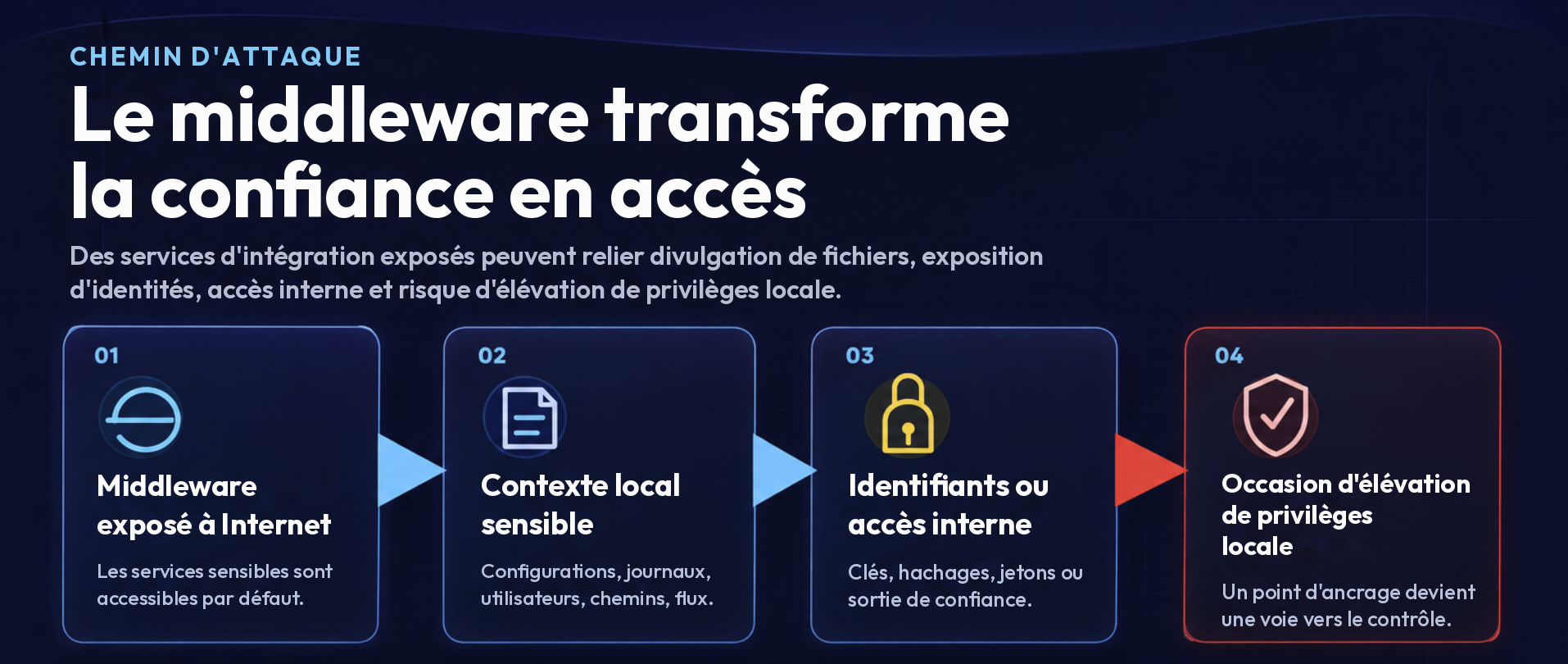
Le risque ne découlait pas d'un seul problème isolé. Il est né de la façon dont plusieurs fonctions exposées s'enchaînaient.
Le service intermédiaire accessible de l'extérieur exposait des fichiers locaux. Ces fichiers révélaient des détails de configuration, un contexte d'identité, des éléments d'identification, des journaux du serveur et de l'information sur les flux de travail. La même position du logiciel intermédiaire permettait aussi d'atteindre des ressources HTTP internes, ce qui signifie que le serveur pouvait servir de pont de confiance vers des surfaces d'application internes.
Concrètement, le chemin d'attaque passait de l'exposition publique au contexte local, du contexte local à la visibilité sur les identifiants et les flux de travail, puis de là à l'accès interne et au risque d'élévation de privilèges.
C'est ce qui rend l'exposition d'un logiciel intermédiaire si dangereuse : elle peut relier, à partir d'un seul système, la divulgation de fichiers, l'exposition d'identités, l'accès interne et les flux de travail de partenaires de confiance.
Que devrions-nous faire?
01
Réduire l'exposition
L'accès externe au logiciel intermédiaire devrait être restreint par défaut. Si une plateforme d'intégration B2B doit être accessible aux partenaires, limitez-la aux adresses IP sources, aux ports, aux noms d'hôte et aux services requis.
N'exposez pas de fonctions d'administration, de diagnostic, de fichiers, de proxy ou de client générique sur la même surface publique.
02
Verrouiller l'exécution des services
Examinez les services intégrés qui peuvent lire ou écrire des fichiers, exécuter des commandes, faire des requêtes HTTP, ouvrir des sockets, gérer des paquets, consulter des journaux, administrer des utilisateurs, examiner la configuration ou tester la connectivité.
Dans les environnements IBM webMethods Integration Server, portez une attention particulière aux utilitaires de fichiers, aux services client HTTP, à la gestion des paquets, aux diagnostics et à tout service associé à Anonymous, Default, Everybody, guest, public ou à de larges groupes d'utilisateurs.
03
Restreindre les chemins sortants
Le logiciel intermédiaire doit souvent se connecter à des systèmes internes et externes, mais il ne devrait pas disposer d'une sortie illimitée.
N'autorisez que les destinations approuvées requises par des flux de travail documentés, surtout pour les applications internes, les interfaces d'administration, les bases de données, le transfert de fichiers et les plans de contrôle infonuagiques.
04
Renouveler et réduire
Si la lecture de fichiers est possible depuis Internet, présumez que les secrets locaux ont été consultés à un moment ou à un autre.
Renouvelez les clés exposées, les mots de passe des magasins de clés, les identifiants SFTP, les mots de passe des comptes de service et les secrets d'application. Retirez les valeurs sensibles des journaux et de l'historique des commandes shell.
Exemples de correctifs pour IBM webMethods Integration Server
Les paramètres exacts et le modèle de contrôle d'accès varient selon l'environnement, la version et les exigences opérationnelles, mais les exemples suivants montrent le type de contrôles que les défenseurs devraient examiner dans les environnements IBM webMethods Integration Server.
01
Renforcer la configuration du serveur
Examinez les paramètres de server.cnf qui touchent l'accès aux fichiers, la connectivité sortante, l'application de TLS et le comportement de repli réseau.
watt.security.pub.getFile.checkReadAllowed=truewatt.net.ssl.client.hostnameverification=truewatt.net.jsse.client.enabledProtocols=TLSv1.2watt.net.jsse.server.enabledProtocols=TLSv1.2watt.net.proxy.fallbackToDirectConnection=false
Ces paramètres aident à réduire le risque de lecture arbitraire de fichiers, à imposer un comportement TLS plus robuste et à empêcher le contournement du proxy par des connexions sortantes directes.
02
Retirer l'exécution anonyme
Examinez users.cnf et vérifiez à quoi le principal Default est associé. Si Default est associé à Anonymous ou à Everybody, des services sensibles peuvent devenir exécutables par des utilisateurs non authentifiés ou trop larges.
- Retirez
AnonymousdeDefault. - Retirez
Everybodylorsque les opérations le permettent. - Remplacez les contextes d'exécution larges par des identités d'administration ou de service nommées.
Les utilisateurs accessibles depuis Internet ne devraient pas hériter de droits d'exécution sur des services intermédiaires sensibles par l'intermédiaire de correspondances par défaut ou anonymes.
03
Restreindre les listes de contrôle d'accès des services
Examinez les listes de contrôle d'accès (ACL) d'Integration Server pour les services intégrés qui peuvent lire des fichiers, faire des requêtes sortantes, examiner la configuration, gérer des paquets, consulter des journaux ou effectuer des actions de diagnostic.
- Retirez
Anonymous,EverybodyetDefaultdes ACL des services sensibles. - Restreignez
pub.client:httpet les autres servicespub.client:*à une ACL d'administration ou de service nommée. - Appliquez le même examen aux services de fichiers, de diagnostic, d'administration, de gestion des paquets et de journalisation.
Les services intégrés devraient être traités comme des fonctions privilégiées, surtout lorsque le serveur est accessible depuis Internet ou depuis des réseaux de partenaires de confiance.
Conclusion
Le logiciel intermédiaire est l'endroit où la confiance d'affaires s'automatise.
Mal configuré, il peut révéler à partir d'un seul endroit des identifiants, la topologie interne, le contexte des transactions, les flux de travail des partenaires et des identités privilégiées.
Pour renforcer un logiciel intermédiaire :
- restreignez l'accès entrant,
- retirez l'exécution anonyme,
- verrouillez les services intégrés,
- refusez l'accès sortant par défaut,
- protégez les journaux comme des données sensibles,
- renouvelez les identifiants exposés,
- et incluez les hôtes intermédiaires dans la priorisation des correctifs axée sur l'élévation de privilèges locale (LPE).
La chaîne d'approvisionnement, l'identité et l'élévation de privilèges locale sont souvent abordées comme des sujets de sécurité distincts. Dans les environnements d'entreprise réels, le logiciel intermédiaire relie les trois.
Références
- IBMIBM completes acquisition of StreamSets and webMethods from Software AG
- IBMAbout built-in services in webMethods Integration Server
- IBMpub.client:http built-in service reference
- IBMIntegration Server watt.security configuration parameters
- OWASPServer-Side Request Forgery Prevention Cheat Sheet
- OWASPLogging Cheat Sheet
- CISAKnown Exploited Vulnerabilities Catalog