


.jpg)
Deirdre Hennigar
Experte en la matière
Aperçu
Microsoft Secure Score peut transformer un environnement Microsoft tentaculaire en une liste concrète d'améliorations de sécurité. Il peut aussi orienter la conversation dans la mauvaise direction lorsque le pourcentage devient l'objectif.
Microsoft décrit le Secure Score comme un résumé chiffré de la posture de sécurité, fondé sur les configurations, le comportement des utilisateurs et d'autres mesures liées à la sécurité. Il représente la mesure dans laquelle une organisation a adopté des contrôles qui peuvent contribuer à réduire le risque. Microsoft est tout aussi clair sur ce que ce chiffre n'est pas : une mesure absolue de la probabilité d'une brèche ou une garantie contre la compromission.
Un exemple concret : quand un meilleur score laisse subsister un risque important
Prenons une organisation dont le Secure Score a augmenté après le déploiement d'une nouvelle politique d'authentification auprès de la majeure partie de son personnel. Dans le tableau de bord, l'amélioration semblait importante. Lors d'un examen de sécurité subséquent, l'organisation a toutefois découvert qu'un administrateur privilégié et plusieurs comptes opérationnels avaient été exclus de la politique.
Le contrôle couvrait presque tout le monde, et le score reflétait ce progrès. Pourtant, le petit groupe laissé en dehors de la politique comprenait des identités capables de créer des comptes, de modifier des paramètres de sécurité et d'accéder à des systèmes sensibles. Du point de vue du risque d'affaires, cette exposition résiduelle comptait davantage que ne le laissait croire le pourcentage.
L'organisation a corrigé deux exclusions involontaires, documenté les exceptions nécessaires sur le plan opérationnel et testé le parcours de connexion concerné. La hausse du Secure Score restait utile, mais le résultat le plus significatif était qu'une voie de compromission à fort impact avait été réduite et que le contrôle avait fait la preuve de son efficacité.
En bref
Utilisez le score pour
- Découvrir les recommandations de sécurité de Microsoft.
- Suivre l'adoption et la couverture au fil du temps.
- Attribuer des responsables et planifier les améliorations.
- Amorcer une conversation sur la sécurité fondée sur le risque.
Ne le confondez pas avec
- Une preuve que les contrôles fonctionnent comme prévu.
- Une vue complète de chaque chemin d'attaque.
- Une garantie qu'aucune compromission ne se produira.
- Une cible universelle qui doit atteindre 100 %.
Le principe directeur :
L'objectif n'est pas de rendre le tableau de bord plus vert. C'est de rendre la compromission plus difficile, la détection plus rapide et les conséquences moins graves.
Ce qui contribue réellement au score
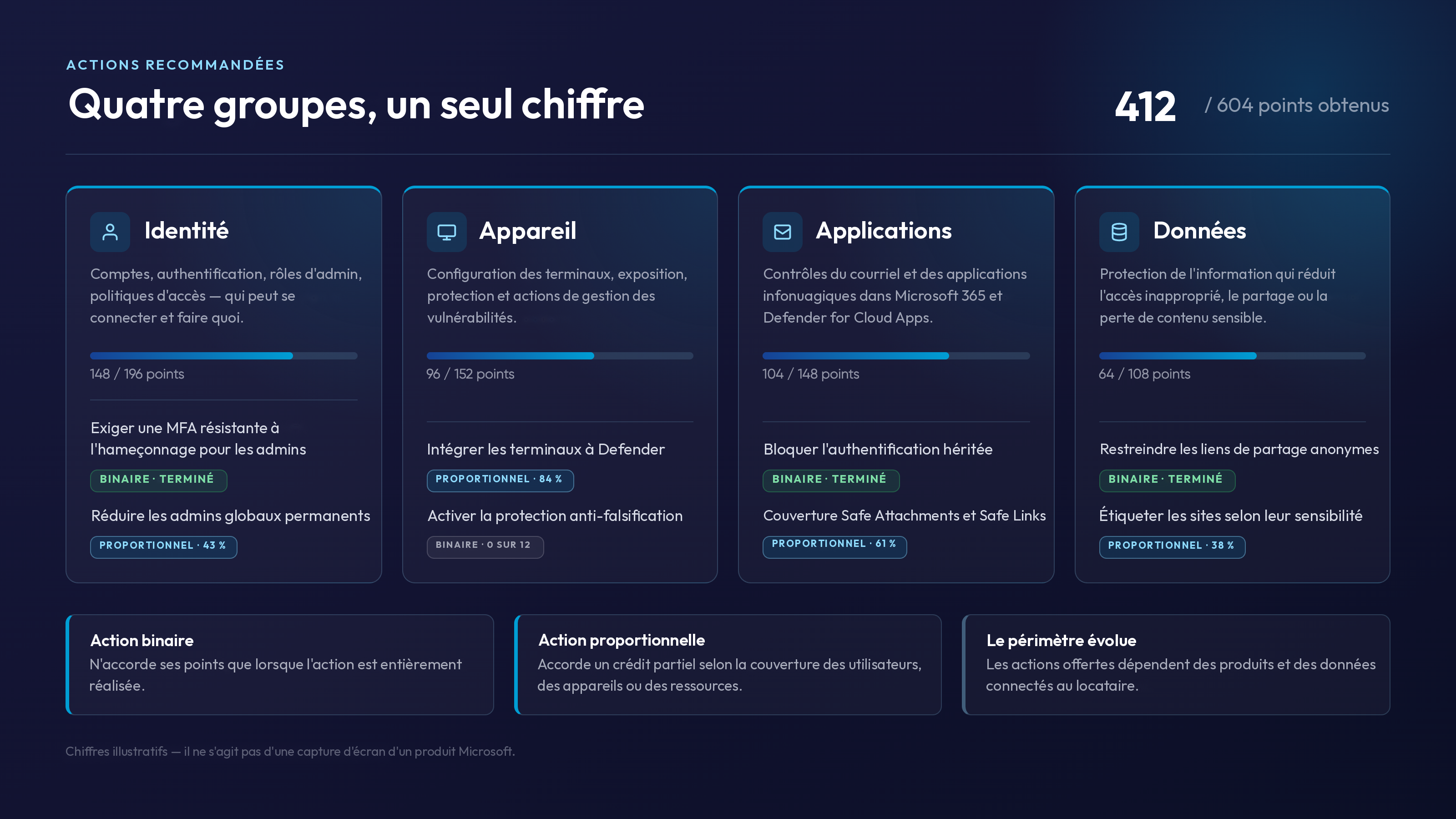
Le Secure Score regroupe les actions recommandées pour les produits Microsoft visibles par le locataire. Dans le portail Defender, ces actions sont réparties en quatre grands groupes.
Identité
Comptes, authentification, rôles administratifs, politiques d'accès et autres contrôles qui déterminent qui peut se connecter et ce que chacun peut faire.
Appareil
Actions de configuration, d'exposition, de protection et de gestion des vulnérabilités des terminaux, rapportées par les services Microsoft pris en charge.
Applications
Contrôles du courriel et des applications infonuagiques, y compris les actions associées à Microsoft 365 et à Defender for Cloud Apps.
Données
Contrôles de protection de l'information qui aident à réduire l'accès inapproprié, le partage ou la perte d'information sensible.
Des points peuvent être accordés pour la configuration d'une fonction recommandée, l'exécution d'une tâche liée à la sécurité ou la consignation qu'une recommandation est traitée au moyen d'un produit non Microsoft ou d'une autre mesure d'atténuation. Les recommandations offertes dépendent des produits et des données connectés au locataire.
La plupart des recommandations sont notées de l'une de deux façons. Une action binaire n'accorde ses points que lorsqu'elle est entièrement réalisée. Une action proportionnelle accorde un crédit partiel selon la couverture des utilisateurs, des appareils ou d'autres ressources.
Pourquoi les scores montent, baissent, tardent à changer ou ne s'affichent pas
Un score est le produit d'un système de mesure, et non une lecture directe de chaque contrôle au moment où vous ouvrez la page. Selon Microsoft, l'expérience Secure Score met à jour l'information affichée et se synchronise aussi quotidiennement pour recevoir les données système. Les actions recommandées réalisées peuvent prendre de 24 à 48 heures à apparaître, et l'état de certaines recommandations Microsoft Teams et Entra suit son propre cycle d'actualisation mensuel ou hebdomadaire.
Le score peut aussi varier parce que le contexte de mesure a changé. Microsoft peut ajouter ou réviser une recommandation. Une nouvelle charge de travail connectée peut faire entrer davantage de points possibles dans le périmètre. Le nombre d'utilisateurs ou d'appareils évalués par un contrôle proportionnel peut changer. Une licence ou le déploiement d'un produit peut faire apparaître d'autres recommandations.
Cela crée deux situations en apparence contradictoires. Une équipe de sécurité peut améliorer un contrôle important sans voir de changement pendant un certain temps. Elle peut aussi faire du bon travail pendant que le pourcentage baisse, parce que le dénominateur ou la population évaluée a changé.
Lorsque le chiffre bouge de façon inattendue, commencez par l'historique et le détail des recommandations. Demandez-vous ce qui a changé dans les points obtenus, les points possibles, la population évaluée, les produits connectés et les données d'état avant de traiter la variation comme un événement de sécurité.
Une couverture partielle peut masquer une exposition importante
La notation partielle est utile parce qu'elle reconnaît les progrès. Elle peut aussi résumer un fait opérationnel important en une fraction rassurante.
Si un contrôle protège 50 utilisateurs sur 100, une recommandation proportionnelle peut accorder environ la moitié de ses points. Le score enregistre le progrès. L'équipe de sécurité doit tout de même expliquer qui sont les 50 autres utilisateurs, pourquoi ils demeurent hors du contrôle et si certains d'entre eux ont un accès privilégié ou à fort impact.
50 % couvert
La couverture doit donc se lire dans les deux sens. « Quatre-vingt-quinze pour cent protégés » semble solide; « cinq pour cent non protégés » soulève les questions qui comptent. Ces exclusions sont-elles intentionnelles? Comprennent-elles des administrateurs, des comptes de service, des appareils partagés, des comptes d'accès d'urgence ou des systèmes qui ne tolèrent pas la politique par défaut? Un autre contrôle est-il réellement en place?
La part restante n'est pas toujours la moins importante. Dans l'exemple précédent, la politique d'authentification couvrait la plupart des utilisateurs, mais un seul administrateur privilégié exclu représentait un impact potentiel sur l'entreprise plus grand que de nombreux comptes à faible risque réunis. Une petite lacune autour d'une identité privilégiée ou d'un poste de travail critique peut compter davantage qu'une large couverture d'actifs à faible impact.
Pourquoi 100 % est rarement le bon objectif
Un score parfait peut être incompatible avec la façon dont une organisation fonctionne. Certaines recommandations exigent des licences, des changements d'architecture, des perturbations pour les utilisateurs ou des prérequis opérationnels qui ne conviennent pas à tous les environnements. D'autres peuvent entrer en conflit avec un processus d'affaires légitime ou être couvertes par un contrôle que Microsoft ne peut pas observer.
Courir après chaque point peut aussi fausser les priorités. Une équipe peut réaliser plusieurs recommandations faciles et à faible impact tout en laissant en suspens un contrôle difficile sur un chemin d'attaque probable. Le tableau de bord devient plus vert, mais ce qu'un attaquant peut accomplir n'a pas suffisamment changé.
Les propres directives de Microsoft sur l'Identity Secure Score recommandent aux organisations de se concentrer sur les recommandations très importantes qui les concernent plutôt que de viser un score minimal précis. Une cible mature n'est pas « 100 % ». C'est le traitement complet des recommandations qui comptent : mises en œuvre, planifiées avec des échéances et des responsables, ou sciemment acceptées avec preuves et révision à l'appui.
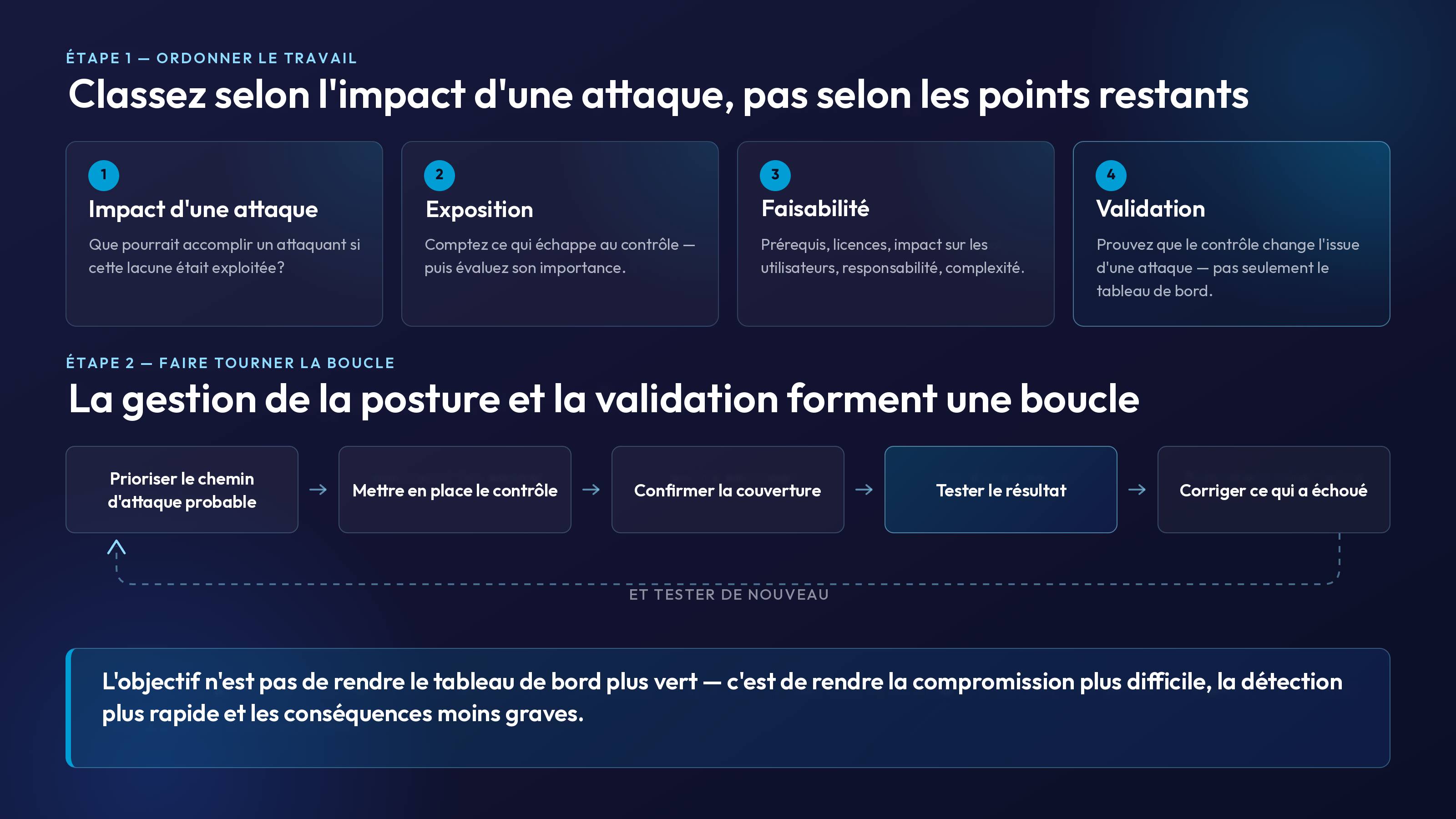
Priorisez les recommandations selon l'impact d'une attaque
Le classement par défaut est utile pour trouver des améliorations réalisables. Selon Microsoft, le classement tient compte des points restants, de la difficulté de mise en œuvre, de l'impact sur les utilisateurs et de la complexité. Ce n'est pas la même chose qu'un classement des risques propre à une organisation.
Ajoutez le contexte d'affaires et d'attaque avant de planifier le travail.
1
Commencez par l'impact d'une attaque
Demandez-vous ce qu'un attaquant pourrait accomplir si la lacune était exploitée. Priorisez les identités privilégiées, l'authentification résistante à l'hameçonnage, l'authentification héritée, la couverture des terminaux, la compromission du courriel, le partage externe, l'hygiène des rôles et la visibilité de la détection.
2
Mesurez l'exposition
Déterminez les utilisateurs, les appareils, les applications et les systèmes critiques qui échappent au contrôle. Chiffrez la lacune, puis examinez l'importance de ce qui reste exposé.
3
Tenez compte de la faisabilité
Prenez en considération les prérequis, les licences, l'impact sur les utilisateurs, la responsabilité opérationnelle et la complexité de mise en œuvre. Servez-vous de ces facteurs pour ordonner le travail.
4
Validez le résultat
Confirmez l'attribution, l'application, la journalisation, l'acheminement des alertes et la résistance aux contournements probables. La preuve que le contrôle change l'issue d'une attaque vaut plus que les points à eux seuls.
La configuration n'est pas une validation
Le Secure Score répond le mieux à une question de configuration : Microsoft détecte-t-il que l'action recommandée a été adoptée? Les responsables de la sécurité ont besoin d'une deuxième réponse : le contrôle fonctionne-t-il correctement face au comportement d'attaque qu'il est censé bloquer ou révéler?
Une politique peut exister tout en visant le mauvais groupe. Un contrôle d'appareil peut être déployé alors qu'un terminal critique reste en mauvais état. Une alerte peut se déclencher dans une file dont personne n'est responsable. L'authentification multifacteur peut être activée alors que des administrateurs utilisent encore des méthodes vulnérables à l'hameçonnage. Une recommandation peut être marquée comme résolue au moyen d'une autre mesure d'atténuation que personne n'a testée depuis un an.
La validation devrait confirmer que :
- La politique est attribuée aux identités, aux appareils et aux applications visés.
- Les exclusions sont documentées, réduites au minimum et révisées périodiquement.
- Le contrôle est appliqué, et pas seulement configuré.
- La télémétrie et les alertes prévues parviennent à une destination surveillée.
- Les intervenants savent quoi faire lorsque le contrôle détecte un comportement suspect.
- Des tests sécuritaires démontrent que le contrôle prévient, détecte ou contient la technique visée.
Dans le scénario précédent, constater la présence de la politique d'authentification dans le locataire établissait seulement qu'elle avait été configurée. L'examen de sa portée a révélé les exclusions involontaires, tandis que des tests sécuritaires ont montré si la politique bloquait réellement le parcours de connexion visé et générait une alerte pour les intervenants.
La distinction est simple : la configuration crée un état voulu; la validation fournit des preuves sur l'état réel.
Rendre compte des progrès à la direction sans masquer le risque
Le Secure Score peut être un indicateur utile pour la direction lorsqu'il est présenté comme une tendance mise en contexte. Un pourcentage à lui seul donne une fausse impression de certitude. Associez-le à des mesures qui montrent ce qui a changé et pourquoi c'est important.
Score et tendance
Présentez les points obtenus et possibles, l'évolution dans le temps et tout changement important du dénominateur ou du périmètre des produits.
Réduction du risque obtenue
Nommez les contrôles à fort impact réalisés et les chemins d'attaque, identités, appareils ou données qu'ils protègent.
Couverture et exceptions
Indiquez la population protégée, ce qui reste hors du contrôle et si les exclusions sont intentionnelles et assumées par un responsable.
Risques acceptés et reportés
Résumez les acceptations de risque importantes, les autres mesures d'atténuation, les dépendances de licences, les dates cibles et les responsables.
Preuves de validation
Incluez les résultats des examens de configuration, des tests de contrôles, des exercices de simulation de brèche et d'attaque, des vérifications d'acheminement des alertes et des nouveaux tests après correction. Cela montre si l'amélioration a changé l'issue d'une attaque — et pas seulement le tableau de bord.
Pour reprendre l'exemple précédent, un énoncé concret pour la direction pourrait être : « Le Secure Score est passé de 61 % à 68 %. Plus important encore, tous les administrateurs privilégiés sont maintenant couverts par la nouvelle politique d'authentification, deux exclusions involontaires ont été supprimées et la validation a confirmé que le parcours de connexion le moins résistant à l'hameçonnage a été désactivé dans toute l'organisation et que les tentatives ont été journalisées. Trois recommandations à plus faible impact demeurent des risques acceptés, avec des dates de révision. »
C'est plus éclairant que « nous avons gagné sept points », parce que cela relie l'indicateur à la couverture, à l'impact d'une attaque, aux preuves et au risque résiduel.
Faire de la gestion de la posture une résilience démontrée
Le Secure Score est une source d'orientation utile. Il aide les équipes à découvrir les contrôles recommandés, à organiser le travail, à suivre l'adoption et à expliquer les progrès. L'erreur est de lui demander de répondre à des questions pour lesquelles il n'a pas été conçu.
La gestion de la posture indique où des contrôles devraient exister. La validation par simulation de brèche et d'attaque vérifie si ces contrôles changent le résultat lorsque des techniques réalistes se heurtent à l'environnement. Utilisées ensemble, elles forment une boucle opérationnelle plus solide : prioriser le chemin d'attaque probable, mettre en place le contrôle, confirmer la couverture, tester le résultat, corriger ce qui a échoué et tester de nouveau.
C'est ce parcours qui mérite d'être mesuré. Pas le chemin le plus court vers 100 %, mais un chemin défendable pour rendre la compromission plus difficile, la détection plus rapide et les conséquences moins graves.
Sources
- Microsoft Learn Microsoft Secure Score
- Microsoft Learn Assess your security posture with Microsoft Secure Score
- Microsoft Learn What is the Identity Secure Score?